
nuxt3 基础使用1
文档地址: https://nuxt.com/
中文文档: https://nuxtjs.org.cn/
一、项目搭建
项目说明
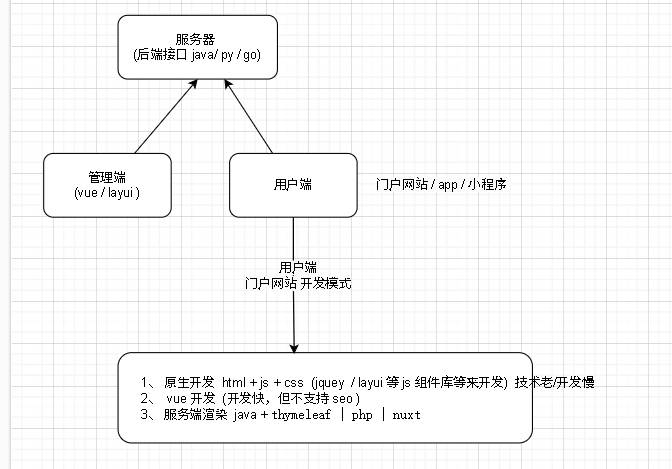
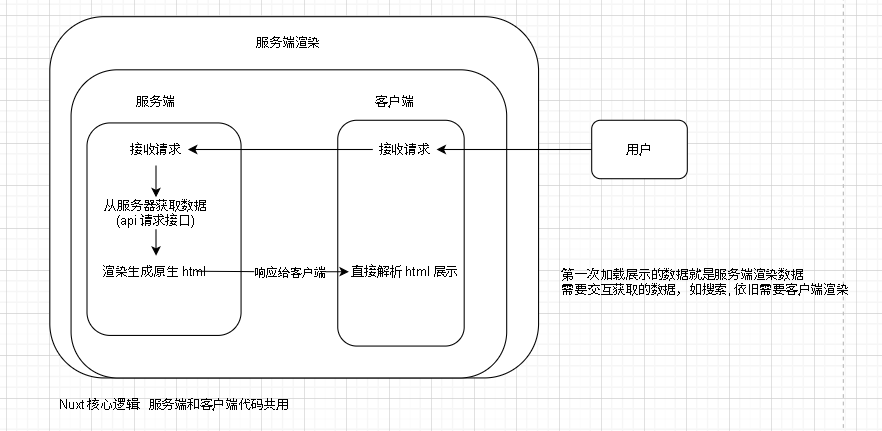
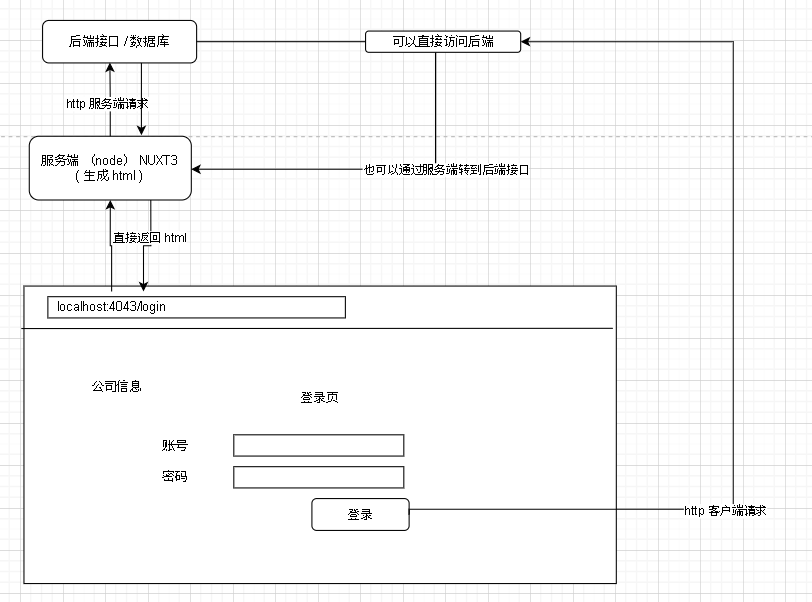
nuxt 是服务端 + 客户端 同时存在的项目, 大部分客户端的无需交互就可以展示的内容由服务端直接渲染来展示,因此来通过 seo 的支持
初始化项目
https://nuxt.com/docs/getting-started/installation
https://codeload.github.com/nuxt/starter/tar.gz/refs/heads/v3
依赖版本
npm list
项目目录结构
启动端口配置
devServer: {
    host: "0.0.0.0",
    port: 3001,
},
2
3
4
2
3
4
引入 element-plus
https://nuxt.com/modules?q=element-plus
二、路由
路由自动识别
https://nuxt.com/docs/api/components/nuxt-page
https://nuxt.com/docs/getting-started/routing
1、根据文件路径/ 名称自动识别路由名称
2、动态路由自动识别 [xxx].vue
该方式可以处理用 .html 的情况
3、 嵌套路由自动识别
[xxx]/test.vue
路由重定义和别名
definePageMeta({
    path: '/index.html',
    alias: '/',
})
2
3
4
5
2
3
4
5
其他相关
手动编写路由: https://nuxt.com/docs/guide/recipes/custom-routing
编程式跳转: https://nuxt.com/docs/api/utils/navigate-to
其他路由操作: https://nuxt.com/docs/api/composables/use-router
三、自动注册
在 composables 和 utils 下的方法会自动注册,其他地方可以直接调用
composables: https://nuxt.com/docs/guide/directory-structure/composables
utils: https://nuxt.com/docs/guide/directory-structure/utils
composables 下创建: test.js
export const helloTest = async (params) => {
    return "hello" + params;
}
2
3
2
3
任意 .vue 文件下使用
helloTest(" 666")
四、全局参数
定义
  // 全局参数
    runtimeConfig: {
        // 只在服务端可获取
        isServer: "true",
        public: {
            // 在服务端 + 客户端都能获取
            baseUrl: "192.168.1.231:10008"
        }
    }
2
3
4
5
6
7
8
9
2
3
4
5
6
7
8
9
使用
const config  =useRuntimeConfig()
config.xxx
2
2
五、判断是服务端还是用户端
A
B
C
import.meta 判断
if(import.meta.server){
    // 服务端
}

if(import.meta.client){
    // 客户端
}
2
3
4
5
6
7
2
3
4
5
6
7
全局参数 判断
我们之前定义了一个全局参数 isServer
1、如果当前代码中能获取到 isServer 的值,就说明是服务端
2、如果当前代码中不能获取到 isServer 的值,就说明是客户端
const config  =useRuntimeConfig();
config.isServer
2
2
六、SSR 共享状态 useState
https://nuxt.com/docs/api/composables/use-state
在服务端 + 用户端可以共享数据
注意: 数据只在当前页面有效,刷新页面会丢失数据 (如: a 链接跳转地址)
定义
let res = useState("count',()=>{
    return 0;
}

// 读取+操作数据, 可以使用 callOnce 调用接口来异步设置数据 (详见文档)
res.value++
2
3
4
5
6
2
3
4
5
6
注意: 这里服务端会执行一次 res.value++, 客户端也会执行一次 res.value++
七、客户端全局状态 pinia
pinia= 客户端全局参数
pinia文档: https://pinia.vuejs.org/core-concepts/state.html
1、安装插件
安装1: https://nuxt.com/modules?q=pinia
安装2: https://pinia.vuejs.org/ssr/nuxt.html#Installation
2、添加
composables/useStore.js
import { defineStore } from 'pinia'

export const useStore = defineStore('storeId1', {
    state: () => ({
        count: 0,
    }),
    actions: {
        increment() {
            this.count++
        },
        decrement() {
            this.count--
        },
    },
    getters: {
        doubleCount: (state) => state.count * 2,
    },
})
2
3
4
5
6
7
8
9
10
11
12
13
14
15
16
17
18
2
3
4
5
6
7
8
9
10
11
12
13
14
15
16
17
18
3、使用
直接使用
// 直接获取数据并操作
let count = store.count;
store.count++;

// 调用 actions 方法
useStore().increment();
useStore().decrement();

// 调用 getters 方法
useStore().getters();
2
3
4
5
6
7
8
9
10
2
3
4
5
6
7
8
9
10
注意: pinia 的数据是存储在内存中的,浏览器刷新,关闭会丢失数据, 可以在 useStore 下方法中添加把数据更新到 localStorage 或 cookie 中
pinia 插件: pinia-plugin-persistedstate
https://nuxt.com/modules?q=pinia-plugin-persistedstate
多页面自动更新数据
initStorageListener() {
   // 监听 localStorage 变化
   if(import.meta.client){
       window.addEventListener('storage', (event) => {
           if (event.key === 'storeId1') {  // storeId1是你的store标识符
               const newValue = JSON.parse(event.newValue)
               if (newValue && newValue.count !== undefined) {
                   this.count = newValue.count
               }
           }
       })
   }
},
2
3
4
5
6
7
8
9
10
11
12
13
2
3
4
5
6
7
8
9
10
11
12
13
需要更新的页面中
useStore().initStorageListener();
八、插件
https://nuxt.com/docs/guide/directory-structure/plugins
- 自定义应用行为 (执行生命周期的钩子,如SSR 渲染完成后执行某些操作,或者在客户端挂载前执行某些操作)
- 添加全局方法和属性
- 处理全局事件 (路由变化、错误处理)
- 集成第三方库
- 初始化和配置 (设置全局样式、初始化第三方服务等)
- 注册全局组件和指令 (有点多余, 已经存在自动注册的组解目录)
九、生命周期钩子
https://nuxt.com/docs/api/advanced/hooks#app-hooks-runtime
服务端渲染html完成
插件中使用
export default defineNuxtPlugin((nuxtApp) => {
  nuxtApp.hook('app:rendered', (renderContext) => {
    // 在 SSR 完成后执行某些操作
    console.log('服务端渲染html完成');
  });
});
2
3
4
5
6
2
3
4
5
6
客户端页面加载完成
插件中使用
export default defineNuxtPlugin((nuxtApp) => {
  nuxtApp.hook('app:mounted', () => {
    // 在客户端应用挂载后执行某些操作
    console.log('客户端页面加载完成');
  });
});
2
3
4
5
6
2
3
4
5
6
或使用 Composition API, 当前 vue 文件中
import { onMounted } from 'vue'; // 已经全局存在了, 可以省略
onMounted(() => {
    console.log("客户端页面加载完成")
})
2
3
4
2
3
4
十、全局路由守卫
https://nuxt.com/docs/guide/directory-structure/middleware
在 middleware 目录下创建 xxx.global.ts 会自动注册,访问路由时自动触发调用
export default defineNuxtRouteMiddleware((to, from) => {
  // 后续处理页面的登录拦截
    console.log("route: " + to.path)

    // 判断是否是客户端
    if (import.meta.client) {
        // 判断是否是不需要登录的 url
        let noTokenUrls = ['/login']
        if (noTokenUrls.includes(to.path)) {
            return;
        }
        if (localStorage.getItem("token")) {
            // 未登录
            return navigateTo('/login.html')
        }
    }
})
2
3
4
5
6
7
8
9
10
11
12
13
14
15
16
17
2
3
4
5
6
7
8
9
10
11
12
13
14
15
16
17